Regex Cheat Sheet: Regular Expressions Explained With Examples
Regular expressions look cryptic, but they're built from a small set of pieces. This cheat sheet explains each one with a clear example, then puts them together into patterns you'll actually use.
Quick answer
The essentials: . any character, \d digit, \w word character, \s whitespace, * zero or more, + one or more, ? optional, {n,m} between n and m, ^ start, $ end, [abc] one of a set, (…) capture group and a|b either. Test every pattern in a regex tester before using it in code.
A regular expression (regex) is a pattern that describes text. You use it to search, validate and replace: find all emails in a document, check that a postcode is valid, or reformat dates. Regex works in almost every programming language and in tools like VS Code, Excel and Google Sheets.
This cheat sheet uses JavaScript syntax, which is very close to Python, Java, PHP and most other languages.
Character classes
| Pattern | Matches | Example |
|---|---|---|
. | Any character except a newline | c.t matches cat, cot, c9t |
\d | A digit (0–9) | \d\d matches 42 |
\w | Letter, digit or underscore | \w+ matches user_1 |
\s | Whitespace (space, tab, newline) | a\sb matches "a b" |
\D \W \S | The opposite of \d, \w, \s | \D+ matches abc |
[abc] | Any one of a, b or c | gr[ae]y matches gray, grey |
[^abc] | Any character except a, b, c | [^0-9] matches any non-digit |
[a-z] | A range | [A-Za-z] matches any ASCII letter |
Quantifiers
| Pattern | Meaning | Example |
|---|---|---|
* | 0 or more | ab*c matches ac, abc, abbc |
+ | 1 or more | ab+c matches abc, abbc (not ac) |
? | 0 or 1 (optional) | colou?r matches color, colour |
{3} | Exactly 3 | \d{3} matches 123 |
{2,4} | Between 2 and 4 | \d{2,4} matches 12, 123, 1234 |
{2,} | 2 or more | \w{2,} matches words of 2+ characters |
*? +? | Lazy: as few as possible | <.+?> matches one HTML tag at a time |
Quantifiers are greedy by default: they match as much as possible. On the text <b>bold</b>, the pattern <.+> matches the whole string, while the lazy <.+?> matches just <b>.
Anchors and boundaries
| Pattern | Meaning |
|---|---|
^ | Start of the text (or of each line with the m flag) |
$ | End of the text (or of each line with the m flag) |
\b | Word boundary: \bcat\b matches "cat" but not "category" |
Use ^…$ when you validate a whole input. Without anchors, \d+ happily matches the "123" inside "abc123xyz".
Groups and alternation
| Pattern | Meaning |
|---|---|
(abc) | Capture group: remembers the match as $1, $2… |
(?:abc) | Non-capturing group: groups without remembering |
(?<year>\d{4}) | Named group, used as $<year> |
cat|dog | Either cat or dog |
\1 | Backreference: the same text as group 1 |
Lookarounds
Lookarounds check what comes before or after, without including it in the match:
| Pattern | Meaning | Example |
|---|---|---|
(?=…) | Followed by | \d+(?=€) matches 50 in "50€" |
(?!…) | Not followed by | \d+(?!€) |
(?<=…) | Preceded by | (?<=\$)\d+ matches 50 in "$50" |
(?<!…) | Not preceded by | (?<!-)\d+ |
Flags
gglobal: find all matches, not just the first.iignore case:/hello/imatches "Hello".mmultiline:^and$match at each line.sdotall:.also matches newlines.uunicode: enables\p{…}classes such as\p{L}for any letter in any language.
Escaping special characters
These characters have special meanings: . * + ? ^ $ { } ( ) [ ] | \ /. To match them literally, put a backslash in front. \. matches a real dot, so example\.com doesn't match "exampleXcom".
Practical patterns you can copy
| Use | Pattern |
|---|---|
| Simple email check | ^[^\s@]+@[^\s@]+\.[^\s@]+$ |
| URL (http/https) | https?:\/\/[^\s/$.?#].[^\s]* |
| Date (YYYY-MM-DD) | ^\d{4}-(0[1-9]|1[0-2])-(0[1-9]|[12]\d|3[01])$ |
| Time (24h HH:MM) | ^([01]\d|2[0-3]):[0-5]\d$ |
| Hex color | ^#([0-9a-fA-F]{3}|[0-9a-fA-F]{6})$ |
| Whole number or decimal | ^-?\d+(\.\d+)?$ |
| Extra spaces | \s{2,} (replace with one space) |
| Trailing whitespace | [ \t]+$ with the m flag |
Validation tip: regex is great for catching typos, but it can't confirm that an email address or URL actually exists. For emails, a simple pattern plus a confirmation email beats a 200-character "perfect" regex.
How to test a regex
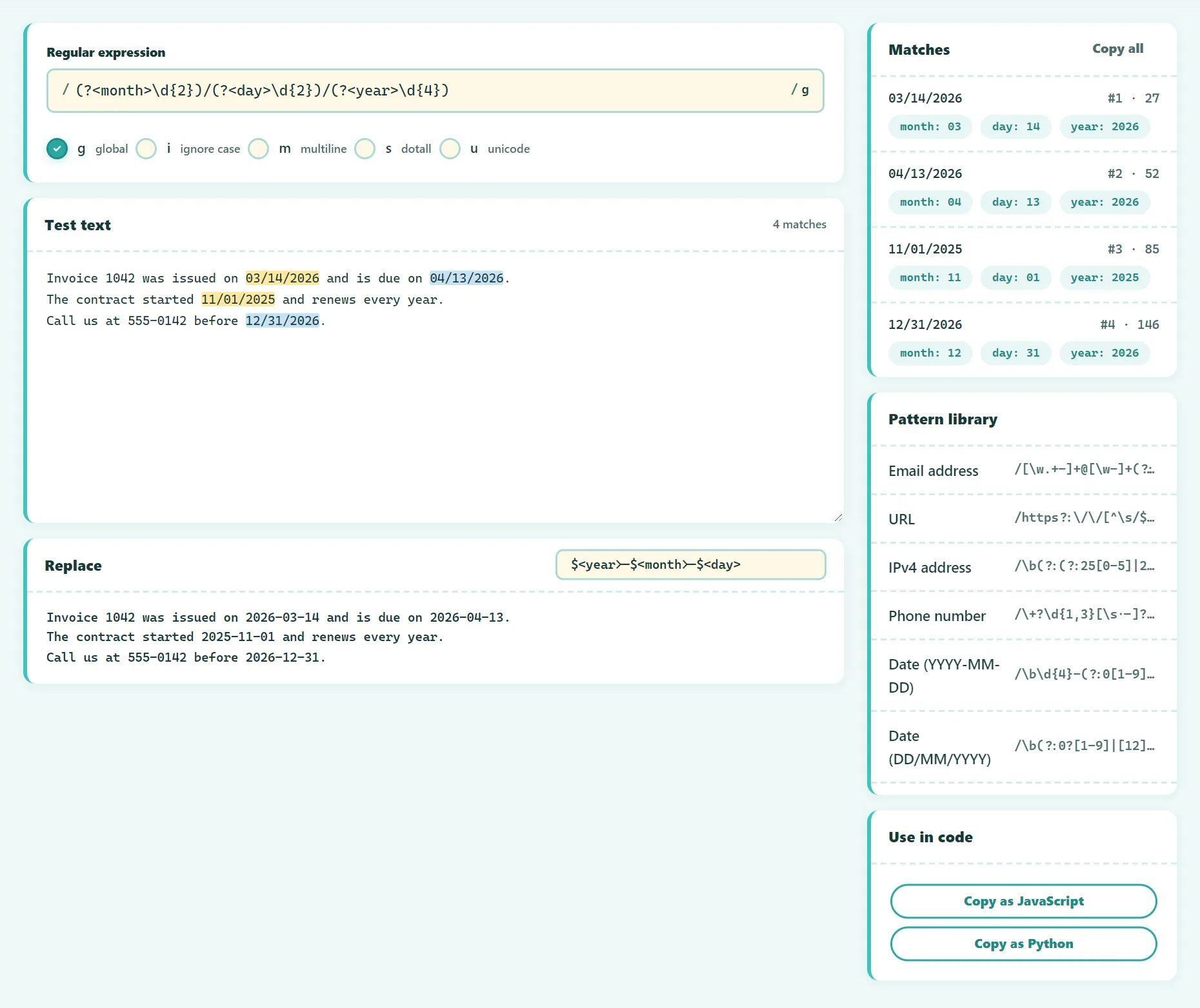
- Open the free Regex Tester.
- Type your pattern and toggle flags (
g,i,m,s,u). - Paste sample text, including examples that should not match.
- Check the highlighted matches and the capture groups listed for each one.
- Preview a replacement with
$1,$<name>or$&. - Copy the pattern as JavaScript or Python code.
Try it free: Regex Tester
Test regular expressions live, with match groups and a pattern library. Runs in your browser, no sign-up.
Example: reformat dates with a replacement
Turn US dates like 12/31/2026 into ISO format 2026-12-31:
Pattern:     (\d{2})\/(\d{2})\/(\d{4})
Replacement: $3-$1-$2
With named groups, the same thing is easier to read:
Pattern:     (?<m>\d{2})\/(?<d>\d{2})\/(?<y>\d{4})
Replacement: $<y>-$<m>-$<d>
Common mistakes
- Forgetting to escape the dot.
.matches anything; use\.for a literal dot. - Missing anchors in validation patterns.
- Overusing
.*. It's greedy and slow. A specific class like[^"]*is safer. - Catastrophic backtracking. Nested quantifiers like
(a+)+$can take forever on certain inputs and freeze a program. Our tester runs patterns with a time limit and warns you. - Parsing HTML with regex. Fine for quick searches, but use a real HTML parser for anything serious.
Frequently asked questions
Is regex the same in every language?
The core syntax is shared, but details differ. Python uses (?P<name>…) for named groups, and some features like lookbehind vary between engines. Always test in the flavor you'll use.
What does \b mean?
A word boundary: the position between a word character and a non-word character. It's how you match whole words only.
How do I match a newline?
Use \n, or \r?\n to also handle Windows line endings.
The bottom line
Learn the building blocks (classes, quantifiers, anchors and groups) and most patterns become readable. Keep patterns specific, anchor them when validating, and always test with real examples before shipping.
Found something out of date or unclear? Email contact@ultratoolsai.com and we'll fix it.