How to Create a Strong Password You Don't Have to Remember
Most password advice you grew up with (swap letters for symbols, change it every 90 days) is outdated. Here's what actually makes a password strong today, and a simple system that keeps every account safe.
Quick answer
A strong password is long (16+ characters), random and unique to one account. Generate it with a password generator, store it in a password manager, and turn on two-factor authentication. For the few passwords you must remember, use a passphrase of 5–6 random words.
What makes a password strong?
Attackers rarely guess passwords one at a time on a login page. More often, they steal a database of hashed passwords in a breach and try billions of guesses per second offline, or they reuse passwords leaked from other sites. A strong password resists both:
- Length. Every extra character multiplies the number of possible passwords.
- Randomness. Patterns like
Summer2026!orP@ssw0rdare in every cracking dictionary. - Uniqueness. If one site is breached, a reused password unlocks all your other accounts.
Length beats complexity
Password strength is measured in bits of entropy: roughly, how many guesses an attacker needs. For a random password, it's length × log₂(number of possible characters).
| Password type | Example | Approx. entropy |
|---|---|---|
| 8 random characters, all types | k#9Tq!2m | ~52 bits |
| 12 random characters, all types | Vb7$pLq2!xRw | ~78 bits |
| 16 random characters, all types | 8f%Kd2!qZr#Lm9@T | ~104 bits |
| 20 random lowercase letters | qmzvthkrpwlxbdfjsnye | ~94 bits |
| 6 random words (passphrase) | orbit-candle-mosaic-river-plum-tiger | ~77 bits (from a 7,776-word list) |
Notice that 20 lowercase letters beat 12 characters with symbols. Adding length is the easiest way to add strength. Each bit doubles the work for an attacker, so the difference between 52 and 104 bits is astronomical.
Current guidance: what changed
NIST, the US standards body whose digital identity guidelines (SP 800-63B) influence security policies worldwide, now recommends:
- Favor length and allow long passwords and passphrases.
- Drop forced composition rules like "must include a symbol", which lead to predictable patterns.
- Stop forcing periodic changes. Change a password when there's evidence it was compromised.
- Check new passwords against lists of breached passwords.
How to generate a strong password
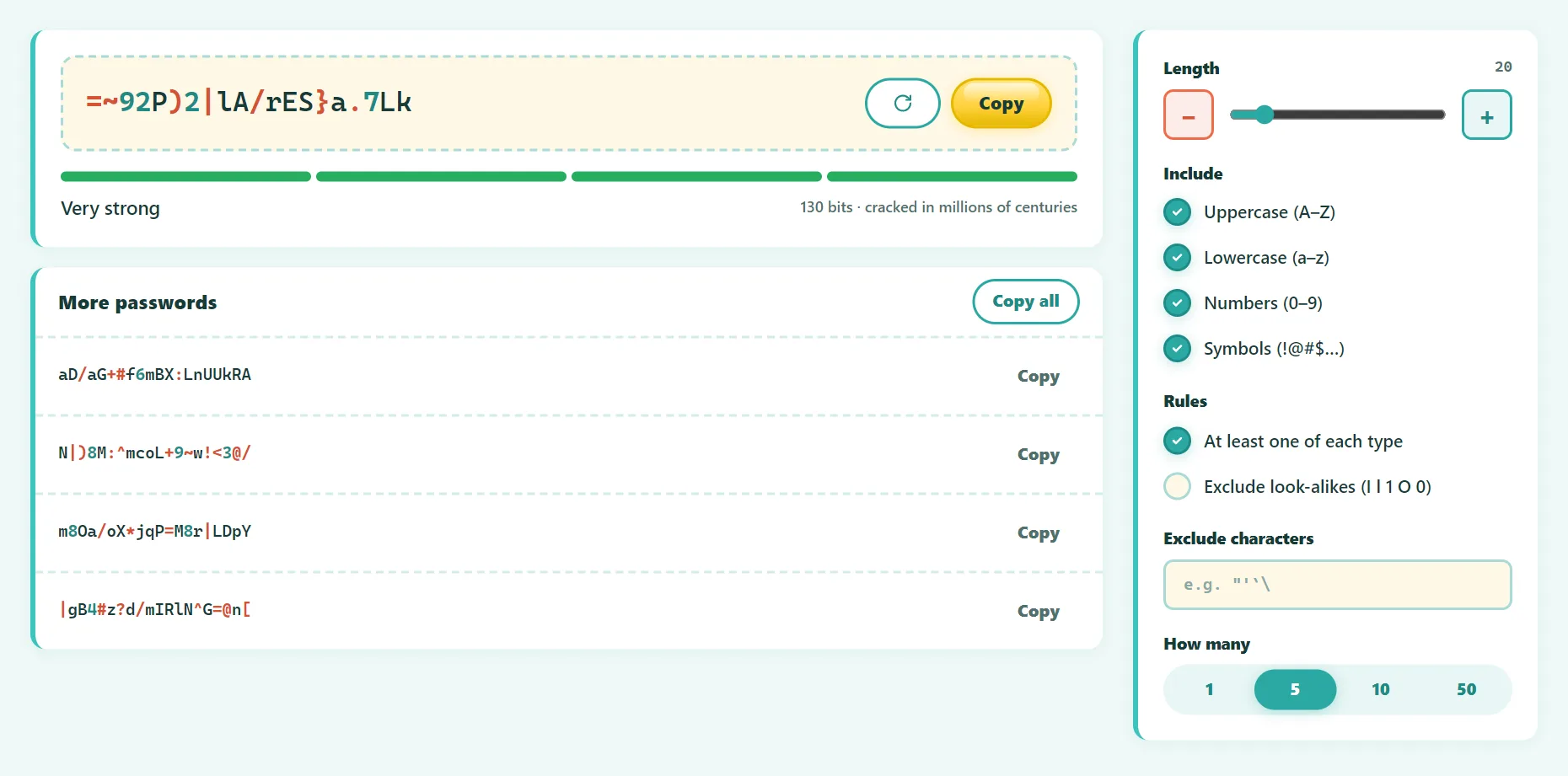
- Open the free Secure Password Generator.
- Set the length to 16 or more (20 for email and banking).
- Keep all four character types on, unless a site restricts them.
- Exclude look-alike characters (I, l, 1, O, 0) if you'll ever type it by hand.
- Check the strength meter, then copy the password straight into your password manager.
The generator uses your browser's cryptographically secure random number generator (crypto.getRandomValues), and nothing is stored or sent.
Try it free: Secure Password Generator
Generate strong random passwords and copy them in one click. Runs in your browser, no sign-up.
Use a password manager
Nobody can remember 100 unique random passwords, and you shouldn't try. A password manager stores them encrypted, fills them in for you, and warns you about reused or breached passwords. Good options include Bitwarden, 1Password, Proton Pass and the managers built into Apple, Google and Microsoft accounts and browsers.
You then need to remember only one strong master password.
Passwords you have to remember: use a passphrase
For your password manager, computer login and phone, use a passphrase: several randomly chosen words, such as orbit candle mosaic river plum tiger. It's long, strong and much easier to type and remember than random symbols.
- Choose words randomly (dice and a word list, or a generator), not a song lyric or quote.
- Use at least 5 words, 6 for a master password.
- Add separators or a capital letter if a site requires it.
Turn on two-factor authentication (2FA)
Even a perfect password can be stolen by phishing. 2FA adds a second step, so a stolen password alone isn't enough. In order of strength:
- Passkeys or hardware security keys: resistant to phishing.
- Authenticator apps (6-digit codes): good and widely supported.
- SMS codes: better than nothing, but vulnerable to SIM swapping.
Start with your email account. Whoever controls your email can reset almost every other password.
Password mistakes to avoid
- Reusing a password on more than one site.
- Personal information: names, birthdays, pets, sports teams.
- Keyboard patterns:
qwerty,123456,1q2w3e. - Predictable substitutions:
P@$$w0rd. - Adding a number to an old password:
Password1→Password2. - Sharing passwords in chat or email. Use your manager's sharing feature instead.
Frequently asked questions
How long should a password be?
At least 16 characters for random passwords, and 5–6 words for passphrases. Use more for your email and password manager.
Are passkeys replacing passwords?
Increasingly, yes. Passkeys let you sign in with your device's fingerprint, face or PIN, and they can't be phished. Use them wherever they're offered, and keep strong passwords everywhere else.
How do I know if my password was leaked?
Services like Have I Been Pwned and the security checkups in password managers and browsers alert you when your email or passwords appear in known breaches.
Is it safe to use an online password generator?
Use one that generates passwords locally with a cryptographically secure random generator and doesn't send them anywhere, like ours.
The bottom line
Go long, go random, never reuse. Let a generator create your passwords, a password manager remember them, and two-factor authentication protect you when something goes wrong.
Found something out of date or unclear? Email contact@ultratoolsai.com and we'll fix it.