How to Minify CSS, JavaScript and HTML for a Faster Website
Minifying your code is one of the simplest ways to speed up a website. Here's what minification actually does, how much it saves, and how to do it safely, whether you have a build pipeline or just a few files.
Quick answer
Minification removes whitespace, comments and unnecessary characters from code without changing what it does. For quick, one-off files, paste the code into a code minifier and copy the result. For ongoing projects, let your build tool (Vite, webpack, esbuild) minify automatically. Always keep your original, readable source files.
What does minification do?
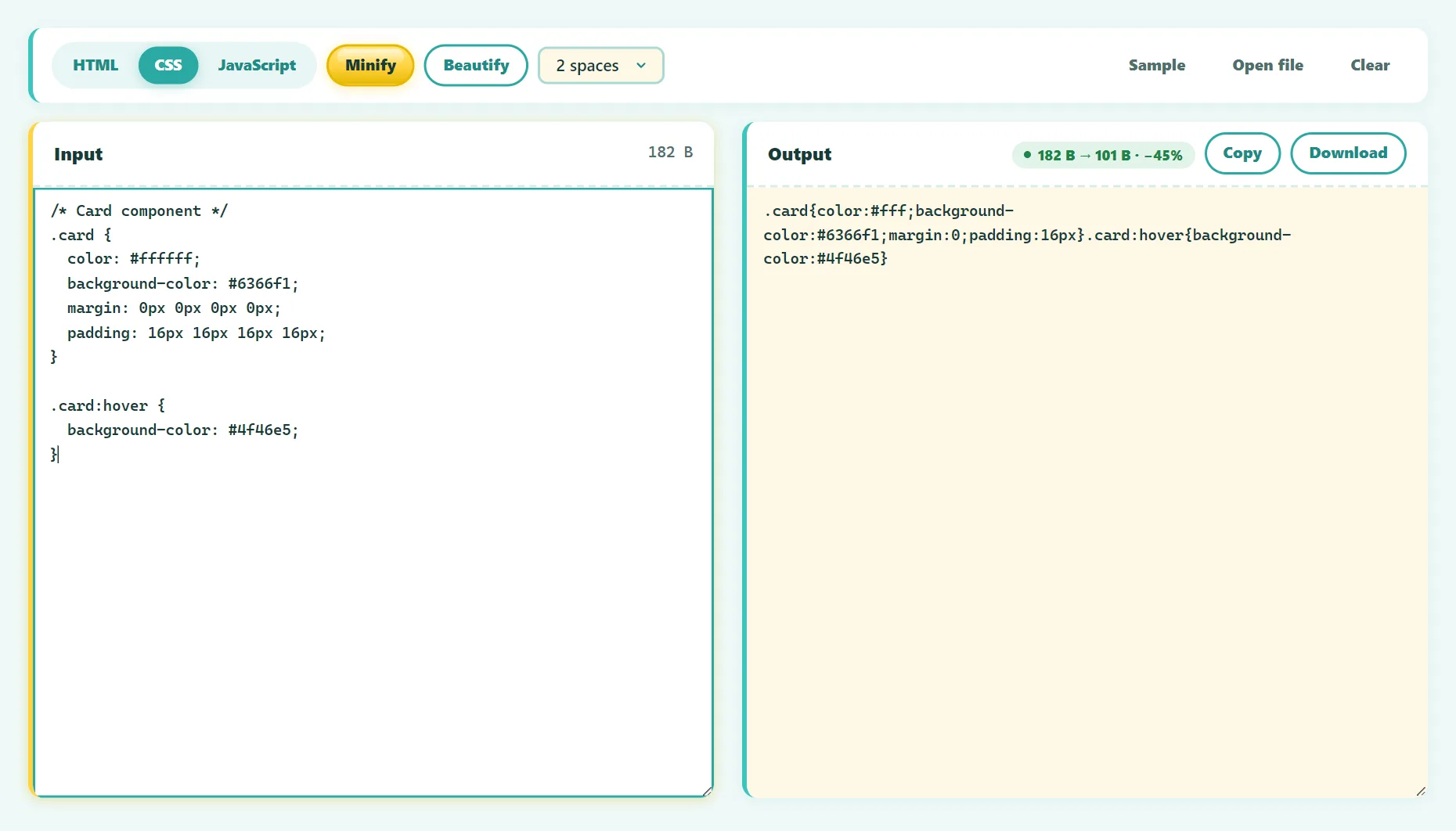
Code is written for humans: indentation, long variable names and comments make it readable. Browsers don't need any of that. Minifiers strip it out:
/* Before: 118 bytes */
.button {
  background-color: #ffffff;
  padding: 10px 20px 10px 20px;
  /* rounded corners */
  border-radius: 8px;
}

/* After: 66 bytes */
.button{background-color:#fff;padding:10px 20px;border-radius:8px}
For JavaScript, minifiers go further: they shorten local variable names, remove unreachable code and simplify expressions, while keeping the program's behavior identical.
Why minify? The performance case
- Smaller downloads. Minification typically shrinks JavaScript and CSS by roughly 30–60% before compression, depending on how the code is written.
- Faster parsing. Less code for the browser to read and process, which matters most on low-end phones.
- Better Core Web Vitals. CSS and JavaScript often block rendering. Smaller files help the page appear sooner, which improves metrics like Largest Contentful Paint.
- Lower bandwidth costs for you and your visitors.
Tools like Google PageSpeed Insights and Lighthouse specifically flag unminified CSS and JavaScript as an opportunity.
Minification vs compression
They're different, and you should use both:
- Minification rewrites the code itself, once, at build time.
- Compression (gzip or Brotli) is applied by the web server to every response and decompressed by the browser.
Minified code compresses well too, so the savings stack. Most hosts, including Apache and LiteSpeed servers, can enable compression in a configuration file like .htaccess.
How to minify code for free
- Open the free Code Minifier & Beautifier.
- Paste your HTML, CSS or JavaScript, or open a file. The language is detected automatically.
- Click Minify. The tool uses Terser for JavaScript and CSSO for CSS, the same engines used by many professional build tools.
- Check the size savings, then copy or download the result.
Your code is processed in your browser, so it's never uploaded.
Try it free: Code Minifier & Beautifier
Minify or beautify HTML, CSS, and JavaScript. Runs in your browser, no sign-up.
What each minifier does
JavaScript (Terser)
- Removes whitespace and comments.
- Renames local variables to short names (
totalPrice→t). - Removes dead code, like branches that can never run.
- Keeps global names, so other scripts that reference them still work.
CSS (CSSO)
- Shortens colors and values (
#ffffff→#fff,0px→0). - Merges duplicate selectors and declarations.
- Removes declarations that are overridden later.
HTML
- Removes comments and collapses whitespace.
- Minifies inline
<script>and<style>blocks. - Preserves content where whitespace matters, like
<pre>and<textarea>.
Minifying in a build process
If your project uses a bundler, minification is usually built in:
- Vite: minifies automatically in production builds (
vite build). - webpack: minifies JavaScript with Terser in production mode.
- esbuild: add the
--minifyflag. - WordPress: caching and performance plugins can minify CSS and JS.
Generate source maps alongside minified files. They let browser developer tools show your original code when debugging.
Beautify: going the other way
Beautifying restores line breaks and indentation to minified code. It's useful to understand a third-party script, debug a production issue, or read code that was shipped without source maps. Note that minified variable names can't be restored, only the formatting.
Safety checklist
- Keep the original source. Never edit minified files directly.
- Test after minifying, especially JavaScript that relies on function or class names (for example, some frameworks or dependency injection).
- Watch for missing semicolons in hand-written JavaScript, which can cause problems when lines are joined.
- Bust the cache when you deploy, by changing the file name or adding a version parameter, so visitors get the new file.
Frequently asked questions
Does minifying affect SEO?
Indirectly. Search engines reward good page experience, and smaller files help pages load faster.
Can minified code be reversed?
Formatting can be restored with a beautifier, but removed comments and original variable names are gone. Minification is not a form of security, though.
Should I minify JSON?
For files sent over the network, yes. Use a JSON formatter with a minify option.
The bottom line
Minify everything you ship, enable gzip or Brotli on your server, and keep readable originals. For quick jobs, a browser-based minifier does it in seconds. For ongoing projects, let your build tool handle it automatically.
Found something out of date or unclear? Email contact@ultratoolsai.com and we'll fix it.