Social Media Image Sizes and Aspect Ratios: The Complete Cheat Sheet
Upload a photo in the wrong shape and the platform crops it for you, often right through someone's head. This cheat sheet lists the sizes that work on every major network and shows how to crop each photo properly.
Quick answer
- Square (1:1): 1080 × 1080 px. Works almost everywhere.
- Portrait (4:5): 1080 × 1350 px. Best for Instagram and Facebook feeds.
- Vertical (9:16): 1080 × 1920 px. Stories, Reels, TikTok and YouTube Shorts.
- Landscape (16:9): 1280 × 720 px or larger. YouTube thumbnails and X/Twitter.
Every platform displays images a little differently, and the specs change from time to time. The good news is that a handful of aspect ratios cover almost everything. Get the shape right, export at a sensible width, and your images will look sharp and uncropped on every network.
Aspect ratio vs image size: what's the difference?
The aspect ratio is the shape of the image: the relationship between width and height. A 1:1 image is square, 16:9 is wide like a TV, and 9:16 is the same shape turned on its side, like a phone screen.
The image size is the number of pixels, for example 1080 × 1350. Two images can have the same ratio but different sizes: 1080 × 1350 and 2160 × 2700 are both 4:5. Platforms care most about the ratio, and they resize the pixels anyway, so focus on getting the shape right first.
The cheat sheet
| Platform | Format | Ratio | Recommended size |
|---|---|---|---|
| Feed post (portrait) | 4:5 | 1080 × 1350 | |
| Feed post (square) | 1:1 | 1080 × 1080 | |
| Stories and Reels | 9:16 | 1080 × 1920 | |
| TikTok | Video and photo posts | 9:16 | 1080 × 1920 |
| YouTube | Video thumbnail | 16:9 | 1280 × 720 |
| YouTube | Shorts | 9:16 | 1080 × 1920 |
| Feed post | 4:5 or 1:1 | 1080 × 1350 / 1080 × 1080 | |
| Stories | 9:16 | 1080 × 1920 | |
| Feed image | 1:1 or 1.91:1 | 1080 × 1080 / 1200 × 627 | |
| X (Twitter) | In-feed image | 16:9 | 1600 × 900 |
| Standard pin | 2:3 | 1000 × 1500 |
Specs change. Platforms adjust their layouts regularly. Instagram, for example, now shows profile grids as taller 3:4 previews, so the top and bottom of a 4:5 post may be trimmed on your profile page. Keep important content away from the edges, and check each platform's help center before a big campaign.
Which ratio gets the most attention?
On mobile feeds, taller images take up more of the screen, so they're harder to scroll past. That's why 4:5 portrait is usually the best choice for Instagram and Facebook feed posts, and why 9:16 dominates short-form video. Landscape 16:9 still wins where content is watched on wider screens: YouTube, presentations and website banners.
How to crop a photo without cutting off faces
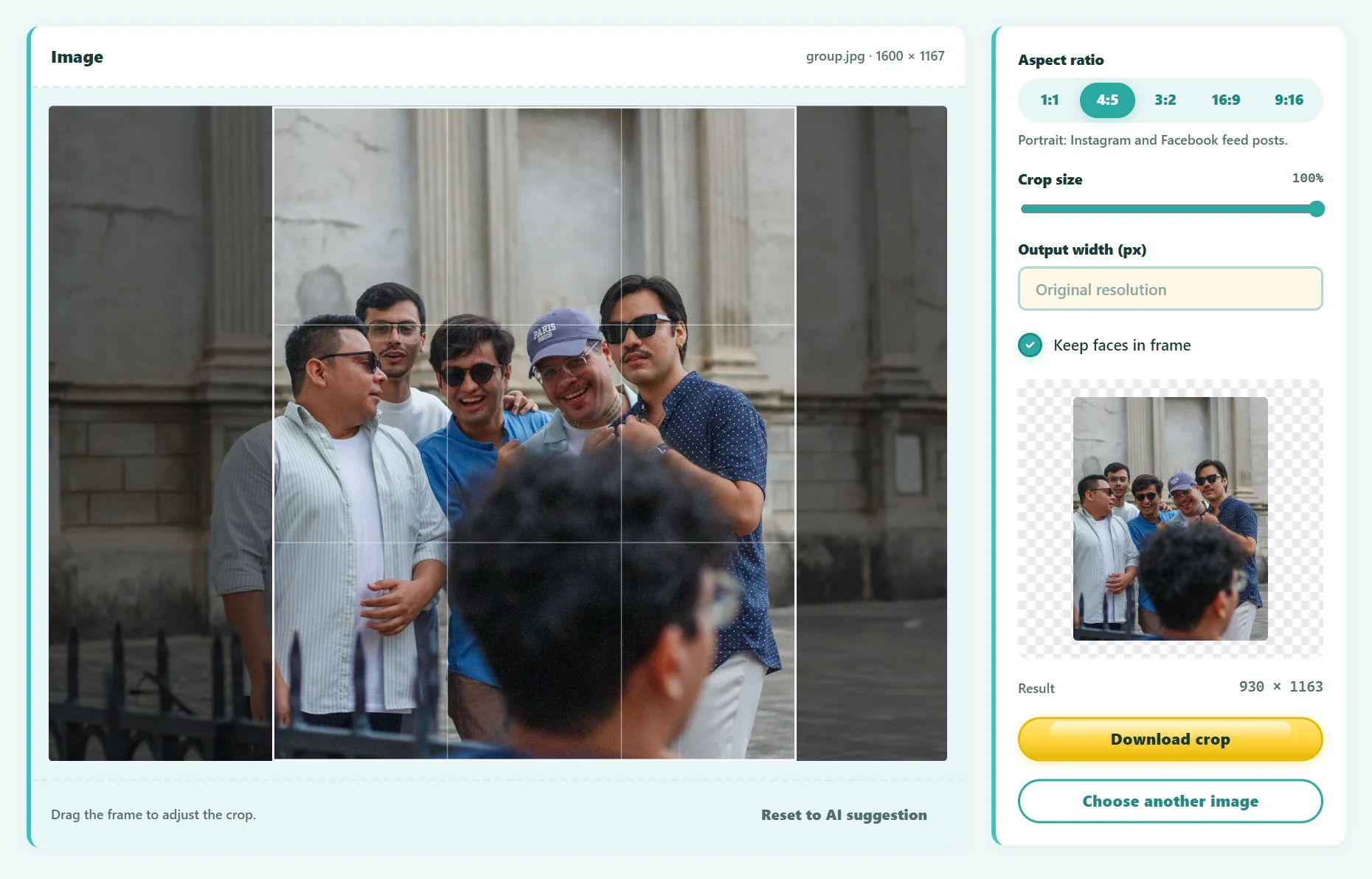
The problem with a simple center crop is that the subject is rarely in the exact center. A smart cropper finds the subject first, then places the frame around it:
- Open the free Smart Image Cropper and drop in your photo.
- Choose a ratio: 1:1, 4:5, 3:2, 16:9 or 9:16.
- The tool detects faces and the most detailed, high-contrast area, and proposes the best frame.
- Drag or resize the frame if you want a different composition.
- Set the output width, for example 1080, and download.
Try it free: Smart Image Cropper
Crop to any aspect ratio while keeping faces and the main subject in frame. Runs in your browser, no sign-up.
Composition tips for each format
Square and portrait (1:1, 4:5)
- Place the subject's eyes about a third of the way down the frame.
- Leave a little space above heads. Cropping exactly at the top of the hair looks cramped.
Vertical (9:16)
- Keep text and faces out of the top and bottom ~250 pixels, where usernames, captions and buttons cover the image.
- Group photos rarely fit well. Crop to one or two people, or use a different photo.
Landscape (16:9)
- For YouTube thumbnails, put the face and any text on the left or right third. The bottom-right corner shows the video length.
- Use large, high-contrast text. Thumbnails are often seen at a very small size.
Why your uploads look blurry (and how to fix it)
- Uploading too small. If you upload a 600-pixel image, it gets stretched. Export at least 1080 px wide.
- Uploading too large. Very large files get heavily recompressed. 1080–2000 px wide is the sweet spot for most feeds.
- Wrong ratio. If the platform has to crop and rescale, quality drops. Crop to the right shape yourself.
- Data saver settings. Some apps upload lower quality on mobile data. Check the app's media upload quality settings.
Frequently asked questions
What's the best image size for Instagram?
For feed posts, 1080 × 1350 pixels (4:5) uses the most screen space. For Stories and Reels, use 1080 × 1920 (9:16).
What size is a YouTube thumbnail?
1280 × 720 pixels (16:9), with a minimum width of 640 pixels. Keep the file under YouTube's size limit by saving as JPG or PNG.
Is 1080 pixels enough?
For most social feeds, yes: 1080 px is the standard width on Instagram, TikTok and Facebook. Use more for thumbnails, banners and anything viewed on large screens.
Can I make one image work everywhere?
Not perfectly. Keep the original and crop separate versions for 4:5, 9:16 and 16:9 so each one is composed properly.
The bottom line
You only need four shapes: 1:1, 4:5, 9:16 and 16:9. Crop each photo to the right ratio yourself instead of letting the platform guess, keep faces and text away from the edges, and export at around 1080 pixels wide.
Found something out of date or unclear? Email contact@ultratoolsai.com and we'll fix it.