How to Summarize an Article (Quickly and Accurately)
A good summary saves time for you and everyone you share it with. Here's a reliable method for summarizing anything by hand, how summarizing tools work, and how to combine both for the best result.
Quick answer
Read the article once for the big picture, identify its main claim and the three to five key supporting points, then rewrite them in your own words at about 10–25% of the original length. To speed this up, run the text through a summarizer first to find the most important sentences, then polish the result.
Summarizing is one of the most useful skills for students and professionals alike. It helps you understand what you read, remember it, and share it in a form others will actually read. The process is the same whether it's a news story, a research paper or a 40-page report.
How to summarize an article in 6 steps
- Skim the structure first. Read the title, subheadings, first paragraph and last paragraph. Most articles state their main point in the opening and repeat it at the end.
- Read the whole thing once without taking notes, to understand the argument as a whole.
- Write the main idea in one sentence. If you can't, you don't understand the article yet. Re-read the introduction and conclusion.
- List the key supporting points. Usually there are three to five: the reasons, findings or steps that back up the main idea. Ignore examples, anecdotes and repetition.
- Write the summary in your own words, starting with the main idea, followed by the supporting points in a logical order.
- Check it against the original. Did you keep the author's meaning? Did you add any opinions of your own? Remove them.
How long should a summary be?
| Purpose | Typical length |
|---|---|
| One-line takeaway for a chat or email | 1–2 sentences |
| Executive summary of a report | About 10% of the original, one page max |
| Study notes for a chapter | 15–25% of the original |
| Abstract of a paper or essay | 150–250 words |
Using a summarizer to speed things up
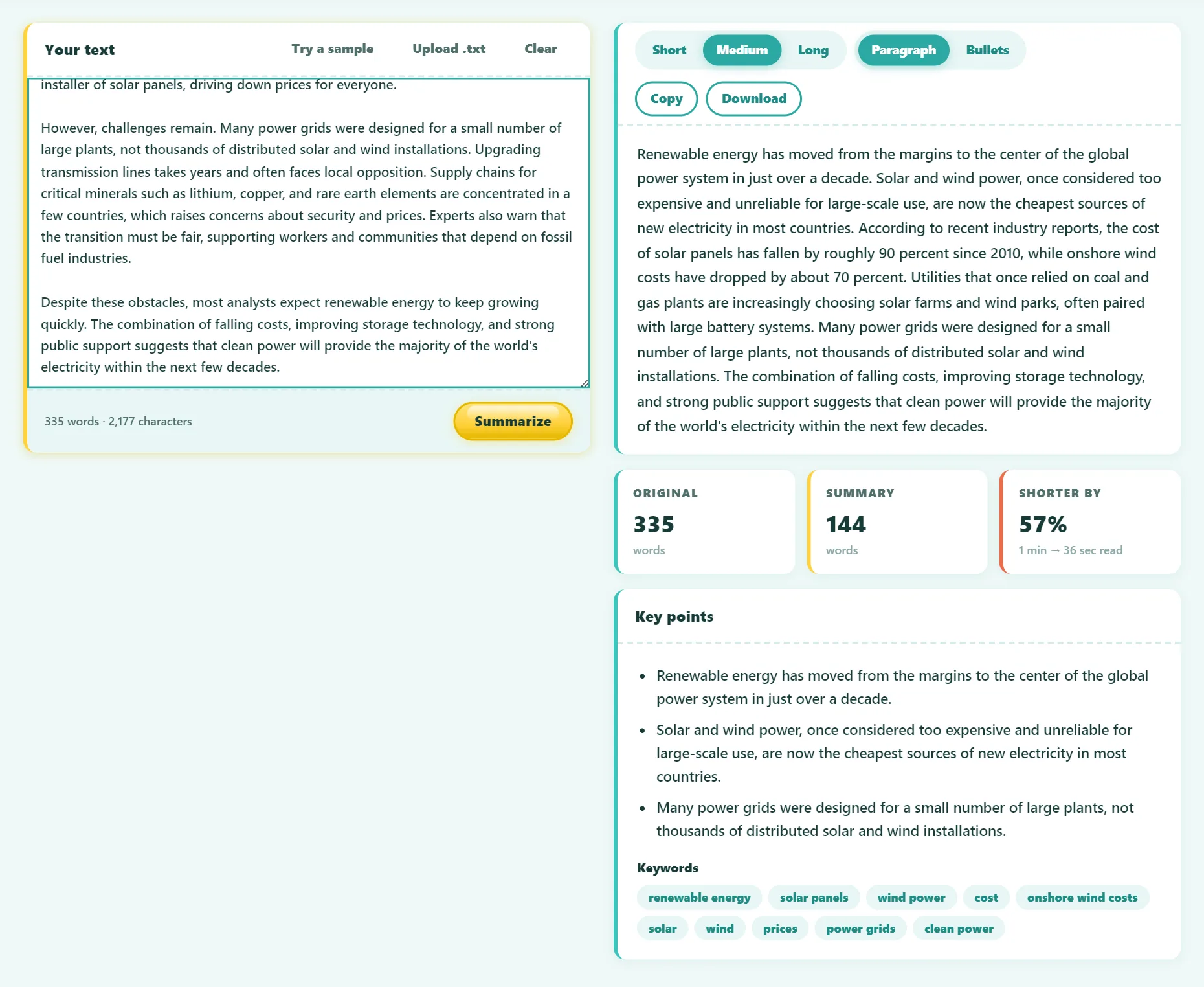
A summarizing tool can do the slowest part, finding the important sentences, in a second:
- Open the free Text Summarizer.
- Paste the article text, or upload a .txt file.
- Choose Short, Medium or Long, and paragraph or bullet format.
- Read the summary, key points and keywords, then copy or download them.
Try it free: AI Text Summarizer
Summarize long articles and pull out the key points. Runs in your browser, no sign-up.
Extractive vs abstractive summaries
There are two kinds of automatic summaries, and the difference matters:
- Extractive summarizers select the most important sentences from the original text and keep them word for word. Our tool uses TextRank, which compares every sentence with every other one and picks those most connected to the main ideas. Because nothing is rewritten, it can't invent facts.
- Abstractive summarizers, like AI chatbots, write new sentences. They read more smoothly, but they can sometimes "hallucinate": add details, change numbers or attribute claims that aren't in the source.
For anything where accuracy matters (legal, medical, financial or academic text), an extractive summary is a safer starting point. You can then rewrite it in your own words.
Tips for a better summary
- Lead with the conclusion. Busy readers should get the main point from the first sentence.
- Keep numbers exact. Copy statistics, dates and names precisely.
- Stay neutral. A summary reports what the author said, not what you think of it. Save opinions for a separate response.
- Use bullets for scanning. Bullet points work well for meeting notes and reports. Paragraphs work better in essays.
- Cite the source. In academic writing, a summary still needs a citation, even when it's fully in your own words.
- Clean the input. When using a tool on a web page, remove menus, ads and comments before pasting.
An example
Imagine a 1,500-word article about remote work. A good short summary might read:
A two-year study of 1,600 employees found that working from home two days a week had no effect on productivity or promotions, while reducing resignations by a third. The authors conclude that hybrid schedules can help companies retain staff at little cost, especially for workers with long commutes.
It states the main finding first, keeps the key numbers, explains why it matters, and leaves out the anecdotes and background.
Frequently asked questions
Is using a summarizer cheating?
Using a tool to understand a text faster isn't cheating. Submitting a tool's output as your own work usually is. Use it as a reading aid, then write your summary yourself and cite the source.
Can I summarize a PDF?
Copy the text out of the PDF and paste it into the summarizer. For scanned PDFs, extract the text first with an image-to-text (OCR) tool.
Does the summarizer work in other languages?
It works best with English. Other languages that separate words with spaces often work too, with more variable quality.
Is my text stored anywhere?
No. Our summarizer runs entirely in your browser, so the text never leaves your device.
The bottom line
A good summary is short, accurate and starts with the main point. Read for understanding, list the key supporting points, and write them in your own words. Use a summarizer to find the important sentences faster, but always check the result against the original.
Found something out of date or unclear? Email contact@ultratoolsai.com and we'll fix it.