Sentiment Analysis of Customer Reviews: A Practical Guide
Reading every review works at 20 reviews, not at 2,000. Sentiment analysis sorts feedback by tone in seconds, so you can spot problems early and see what customers love. Here's how to do it for free.
Quick answer
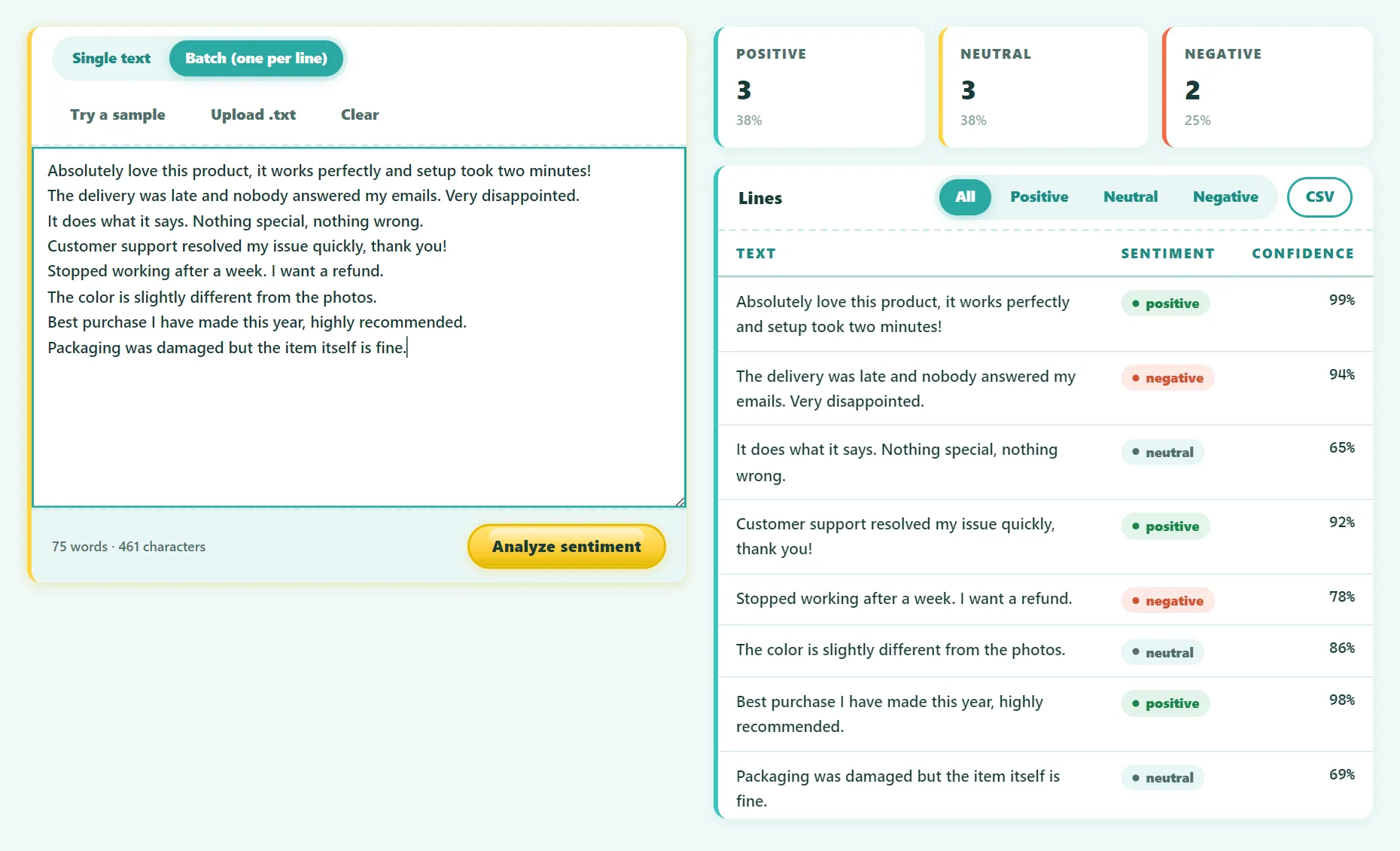
Export your reviews to a spreadsheet, paste them into a sentiment analyzer one review per line, and export the scores as CSV. Then sort by the negative score to find the most urgent problems, and group the comments by topic (shipping, price, quality, support) to see what drives each sentiment.
Star ratings tell you how customers feel overall. The text tells you why. Sentiment analysis bridges the two: it reads the words and classifies the tone, so you can analyze large amounts of feedback without reading every line yourself.
What is sentiment analysis?
Sentiment analysis (also called opinion mining) is a natural language processing (NLP) technique that classifies text by emotional tone, usually positive, neutral or negative. Each piece of text gets a score showing how confident the model is in each label.
How it works
- Lexicon-based methods count positive and negative words from a dictionary. They're simple but easily fooled by phrases like "not bad" or sarcasm.
- Machine learning models learn from thousands of labeled examples. Modern transformer models such as RoBERTa read the whole sentence in context, so "I wanted to love this" is correctly recognized as disappointment.
Our tool uses Twitter-RoBERTa from Cardiff NLP, a model pre-trained on about 124 million social media posts and fine-tuned for sentiment. That makes it well suited to short, informal text like reviews and comments.
Step by step: analyze your reviews for free
- Collect the reviews. Most platforms (Shopify apps, Google Business Profile, app stores, survey tools) let you export reviews as CSV.
- Copy the review text column from your spreadsheet. Each review should be on its own line.
- Open the Sentiment Analyzer, switch to Batch, and paste up to 1,000 lines.
- Run the analysis. The AI model (about 125 MB) downloads once, then runs on your device.
- Review the overall breakdown, then export to CSV.
- Paste the scores back next to your original data (date, product, rating) for deeper analysis.
Because the model runs in your browser, customer names and order details are never sent to a third-party API.
Try it free: Sentiment Analyzer
Classify text and customer reviews as positive, neutral, or negative. Runs in your browser, no sign-up.
Turning scores into decisions
A pile of scores isn't useful on its own. Here's how to get real insight from them:
1. Find the urgent problems
Sort by negative score, highest first. The top 20–30 reviews usually reveal your most serious issues: broken products, delivery failures, billing problems. Reply to these first.
2. Group by topic
Add a "topic" column and tag each negative review: shipping, quality, price, sizing, support, usability. Counting the tags shows which problem costs you the most goodwill.
3. Compare ratings with sentiment
Look for mismatches. A 4-star review with negative text often contains a specific complaint that's easy to fix. A 2-star review with neutral text may be a misunderstanding about the product.
4. Track it over time
Calculate the share of negative reviews each month. A sudden rise after a product change, a new supplier or a website update is an early warning.
5. Learn from the positives
The most positive reviews show what customers value most. Those words make excellent marketing copy, with permission.
Limitations to keep in mind
- Mixed reviews. "Great product, terrible delivery" has two opposite opinions. Look at the scores, not just the label: a near 50/50 split signals a mixed review.
- Sarcasm and irony remain hard for every model.
- Domain language. In some contexts, "sick" or "killer" is praise.
- Long texts. The model is tuned for short text. Split long survey answers into paragraphs.
- Language. This model is trained mainly on English.
Sentiment analysis is best used to prioritize and spot trends. For important decisions, read a sample of reviews yourself.
Frequently asked questions
How accurate is sentiment analysis?
Modern transformer models are accurate on clear, short reviews, but no model is perfect, and people often disagree on borderline cases too. Treat scores as a strong signal, not a verdict.
How many reviews can I analyze at once?
Up to 1,000 lines per batch in our tool. For larger datasets, split them into several batches.
Is it safe to analyze customer data?
With our tool, the analysis runs on your device and nothing is uploaded. Always follow your own privacy policy when exporting customer data.
What's the difference between sentiment and emotion analysis?
Sentiment measures polarity (positive, neutral, negative). Emotion analysis tries to detect specific feelings like anger, joy or fear.
The bottom line
Sentiment analysis turns a wall of reviews into a sorted list of priorities. Score your reviews in batches, deal with the most negative ones first, tag them by topic, and track the trend month by month.
Found something out of date or unclear? Email contact@ultratoolsai.com and we'll fix it.