How to Decode a JWT Token Without Sending It Anywhere
A JSON Web Token looks like a random string, but two thirds of it is just Base64-encoded JSON you can read in seconds. Here is how to decode a JWT, what each claim means, and why you should never paste a real token into a website you do not trust.
Quick answer
A JWT has three parts separated by dots: header.payload.signature. Copy the first or second part, paste it into a Base64 decoder and decode it. You get plain JSON. The tool accepts the URL-safe characters (- and _) and missing = padding that JWTs use. Decoding only reads the token. It does not prove that the token is genuine.
What is a JWT?
A JSON Web Token (JWT, pronounced "jot") is a compact way to pass information between two parties, most often a login system and an API. After you sign in, the server gives your app a token. Your app sends it back with every request to prove who you are.
A typical token looks like this:
eyJhbGciOiJIUzI1NiIsInR5cCI6IkpXVCJ9.eyJzdWIiOiIxMjMiLCJuYW1lIjoiQW5hIiwiZXhwIjoxNzk5OTk5OTk5fQ.4Zr0x...The three parts are:
- Header: says which algorithm signed the token (for example
HS256orRS256) and that the type is JWT. - Payload: the "claims", meaning the data the token carries, such as a user ID, a name, roles and an expiry time.
- Signature: a cryptographic seal made with a secret or private key. It lets the server detect tampering.
The header and the payload are each encoded with URL-safe Base64. That is an encoding, not encryption. Anyone holding the token can read them.
How to decode a JWT, step by step
- Copy the whole token. If it came from an HTTP header, remove the word
Bearerand the space after it. - Split it at the dots. You now have three strings.
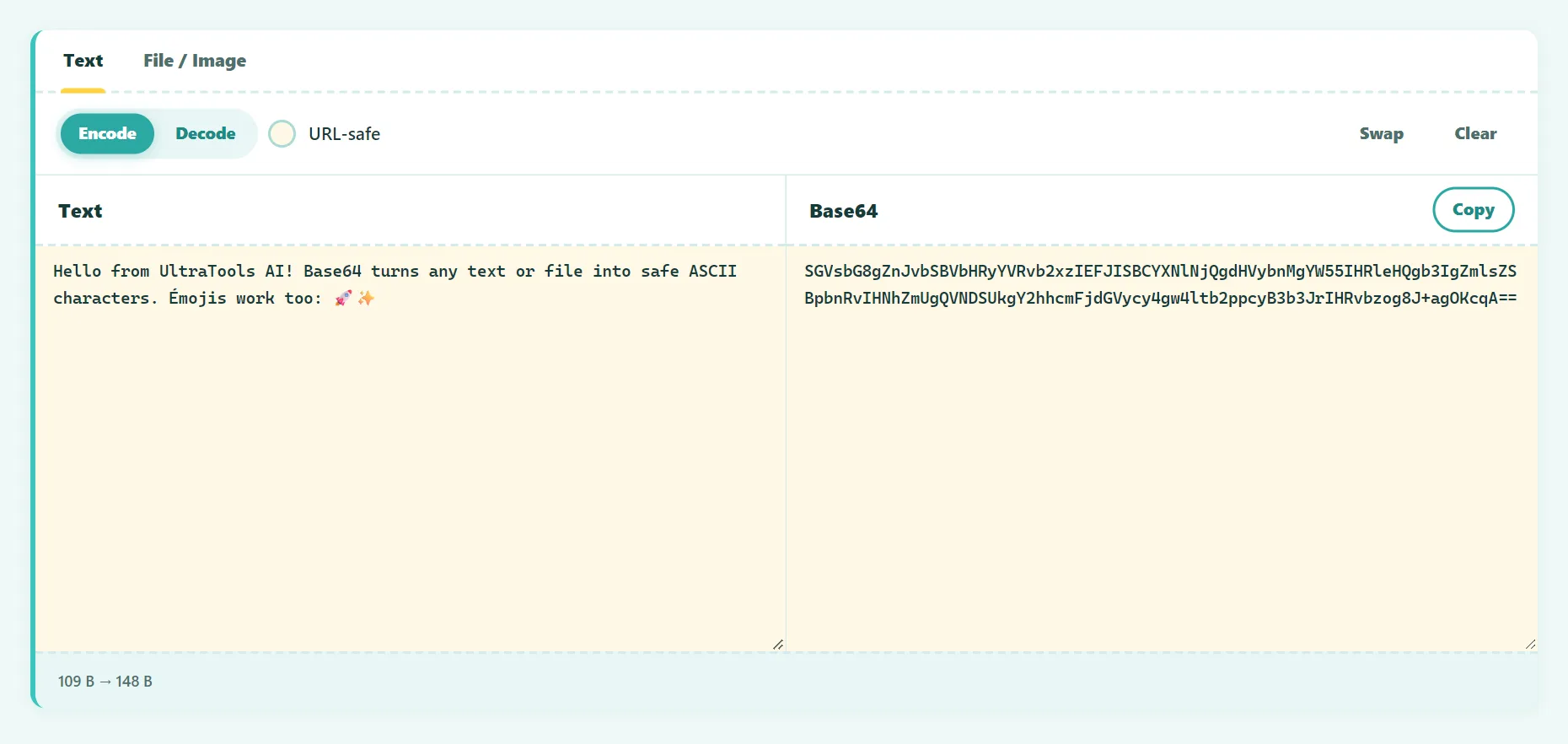
- Open the Base64 Encoder / Decoder and choose Decode.
- Paste the first part (the header). The result is JSON such as
{"alg":"HS256","typ":"JWT"}. - Paste the second part (the payload). This is the interesting one:
{"sub":"123","name":"Ana","exp":1799999999}. - Paste the result into the JSON Formatter if you want it indented and easy to scan.
Do not try to decode the third part. The signature is raw binary data, so it will not turn into readable text.
Try it free: Base64 Encoder / Decoder
Encode or decode text and images to and from Base64. Runs in your browser, no sign-up.
Why you can decode it without any special tool
Base64 was designed to carry data through systems built for text. It is not a secret code. The URL-safe variant used by JWTs replaces + with - and / with _ so the token can sit in a URL or header, and it usually drops the trailing = padding. Our decoder converts those characters back and adds the padding for you, so you can paste each part exactly as it appears in the token.
The claims you will see most often
iss(issuer): who created the token, often a URL.sub(subject): who the token is about, usually a user ID.aud(audience): the service the token is meant for.exp(expiration): when the token stops being valid.iat(issued at): when it was created.nbf(not before): the earliest time it can be used.jti(JWT ID): a unique identifier, useful for revoking a token.
Apps also add their own claims, such as role, email or scope.
Reading the dates
exp, iat and nbf are Unix timestamps: the number of seconds since 1 January 1970 (UTC). A value like 1799999999 is not a date you can read at a glance. Convert it with any timestamp converter, or in a browser console with new Date(1799999999 * 1000). Remember to multiply by 1000, because JavaScript uses milliseconds.
If exp is in the past, the server will reject the token. That is the most common reason for a sudden "401 Unauthorized" in an app that worked a minute ago.
Decoding is not verifying
A decoded token is not a trusted token. Anyone can create a string that looks like a JWT and put any claims in it. Only the server, using the secret or public key, can check the signature. Never decide that a user is an administrator because the payload you decoded says so.
This matters for both sides:
- As a developer, always verify the signature, the expiry and the audience on the server before you trust any claim.
- As a debugger, decoding is perfect for answering questions like "which user is this?" or "when does it expire?", as long as you remember it proves nothing about authenticity.
Keep real tokens private
A valid access token works like a temporary password. Whoever holds it can usually act as you until it expires. That is why many online "JWT decoders" are risky: if a site sends your token to its server, you have handed over a working credential.
- Decode locally. The Base64 tool on UltraTools AI runs in your browser and does not upload what you paste. You can confirm this in your browser's network tab.
- Prefer expired or test tokens when you only need to learn the structure.
- Do not share tokens in chat, tickets or screenshots. If you did, treat the token as compromised and sign out or revoke it.
- Do not put secrets in the payload. Passwords, card numbers and similar data should never be inside a JWT, because every holder can read it.
Troubleshooting
- "Invalid input": you may have pasted the whole token. Decode the parts one at a time. Also make sure no characters were lost when copying.
- The output is unreadable: you probably decoded the signature. Only the first two parts are text.
- The token has five parts: that is a JWE, an encrypted token. Its payload cannot be read without the key.
- The JSON looks wrong: paste it into the JSON Formatter, which points to the exact line and column of any problem.
Frequently asked questions
Is a JWT encrypted?
Normally no. Most JWTs are signed, not encrypted, so the header and payload are readable by anyone who has the token. Encrypted tokens exist (JWE), but they have five parts and are less common.
Can I change a claim and reuse the token?
You can edit the text, but the signature will no longer match, so a correctly configured server will reject it. That is exactly what the signature is for.
Why does my token have no padding at the end?
JWTs use Base64URL, which leaves out the = characters. A good decoder adds them back automatically.
Is it safe to decode a JWT in an online tool?
Only if the tool does the work in your browser. Check that it makes no network request when you paste a token, and avoid pasting production tokens into tools you do not know.
The bottom line
A JWT is a signed envelope, not a locked box. The header and payload are plain Base64URL-encoded JSON, so you can read them with a local Base64 decoder in a few seconds. Use that to debug expiry and claims, verify tokens on your server, and keep real tokens out of any tool that uploads them.
Found something out of date or unclear? Email contact@ultratoolsai.com and we'll fix it.